 GLOBAL EMERGENCY SERVICES
Wiki · Playing tips
Playing tips
Tuning stations for high-value missions
Written by BadWolf from Norway  (BadWolf_NO) while the Chief (Madpugs) was an owner of MissionChief Unofficial · shared by Madpugs · v1.02
A long-term station layout that pushes your mission list toward high-end calls — not overnight, but worth it if you want lots of valuable missions.
When BadWolf started on the US server, the plan was to reach this setup within the first month. It took about 35 days to hit full potential. Stations still needed upgrades after that — but the “good missions” were already flowing.
Premium (recommended)
You can do this without premium, but coins are well spent here. The main premium win is smoother station setup and automatic personnel hiring.
This write-up is for the chemical and industrial fire specialisation. The same idea works for other specialisations — you will need to choose matching vehicles yourself.
Vehicles used in this build
Many units can help; this list is what was kept so the ARR (Alarm and Response Regulations) stay clear as stations grow:
- Quint
- Rescue engine
- Battalion chief unit
- Pumper tanker
- Mobile air
- Mobile Command vehicle — needs EMS Command education
- Hazmat — needs Hazmat education
- Foam tender
- Police Supervisor / Sheriff unit
- K-9 unit
- Police car
As expansions free vehicle slots, ARR shows which types you still need — buy those.
Pick an area and build the generator
Plan to use the area actively for about 30–40 days. Example location: Philadelphia.
- Place a small fire station somewhere central. This is your generator — the station that will produce missions for the area.
- Start every station with a quint as the first vehicle.
- Build fire houses in a circle around the generator — close, but not stacked on top of it. Think “inside the spawn radius” of the generator.
- Add a second circle a bit further out. Aim for roughly 20–25 fire houses in total.
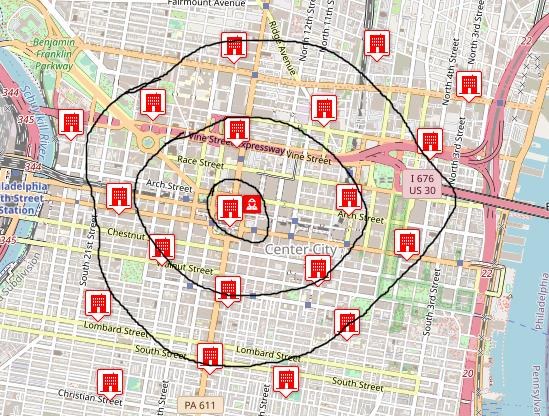
While you build you will get many missions. Ignore them for now — you are laying stations, not farming yet. Share them, clear them later, or let them expire.
Dispatch centre — turn the ring off
- Build a dispatch centre.
- Set its service status to out of service so connected stations do not generate missions.
- On the buildings tab, connect all the new fire houses to this centre (example name: Philly).
- Set personnel desired to 400 (current game maximum).
- Set hiring to automatic (premium). Without premium, set three days and remember to reset every third day.

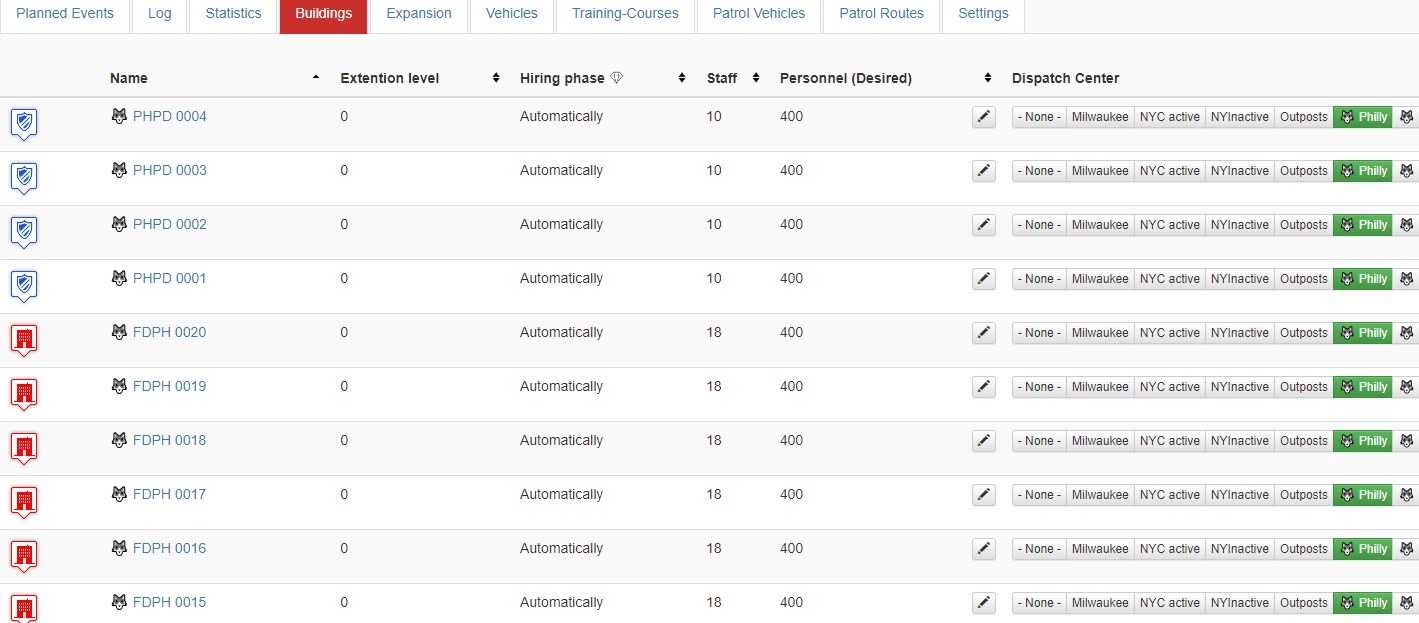
A few police stations can sit between the rings. Rescue/ambulance stations are optional if you want them.
Specialise the generator
Back on the generator fire station:
- Expansions → develop the Foam extension, then set it ready for action.
- Specialization → develop the Foam specialization.
The station overview should then show that it generates chemical and industrial fire missions.


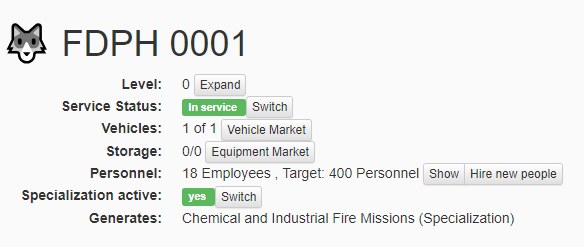
Expand every day
The layout is done; now grow it. Revisit stations daily (or every few days):
- Do not leave everything at level 0.
- Evolve small houses into full fire stations.
- Expand toward level 39.
- Keep buying vehicles and staffing them so they can respond.
ARR for the missions you generate makes it obvious which vehicle types to buy next.
How many missions you get
Mission list size follows how many stations you own of your largest station type. You always get one more mission than that count.
Example: 30 fire stations → 31 missions. Extra police or ambulance stations do not increase that number if fire is still your largest type.
Want more missions? Build more of that type. Small and full stations both count.
Possible missions, POIs, and green rows
Open the help menu (? top-right) → possible missions:
- Green — you can generate that mission.
- White — you still need stations, expansions, or a POI.
Open the details of missions you care about: required vehicles, missing expansions, and any POI (point of interest).
POIs are free. Use set a new POI near your map / new-building controls, place the marker by your generator area, and save it. When other requirements are met, that mission turns green.
One generator, many silent helpers
You can turn stations on and off individually or via dispatch. Roughly one dispatch centre per 25 stations.
Example: 25 fire stations → 26 missions. You want nuclear explosion (power plant), so you place a power plant POI near the generator. The list turns green, but if every house is still under an inactive dispatch centre, nothing spawns yet.
Fix: in the dispatch buildings tab, set the generator’s dispatch link to none so only that station generates. The other 24 stay under the inactive centre — they still respond, they just do not spawn. That locks the spawn radius to the generator.

One POI type only supports one active mission of that kind at a time. For more concurrent nuclear (or similar) calls, place more POIs of the same type near the generator. More matching POIs → more chances that mission appears.
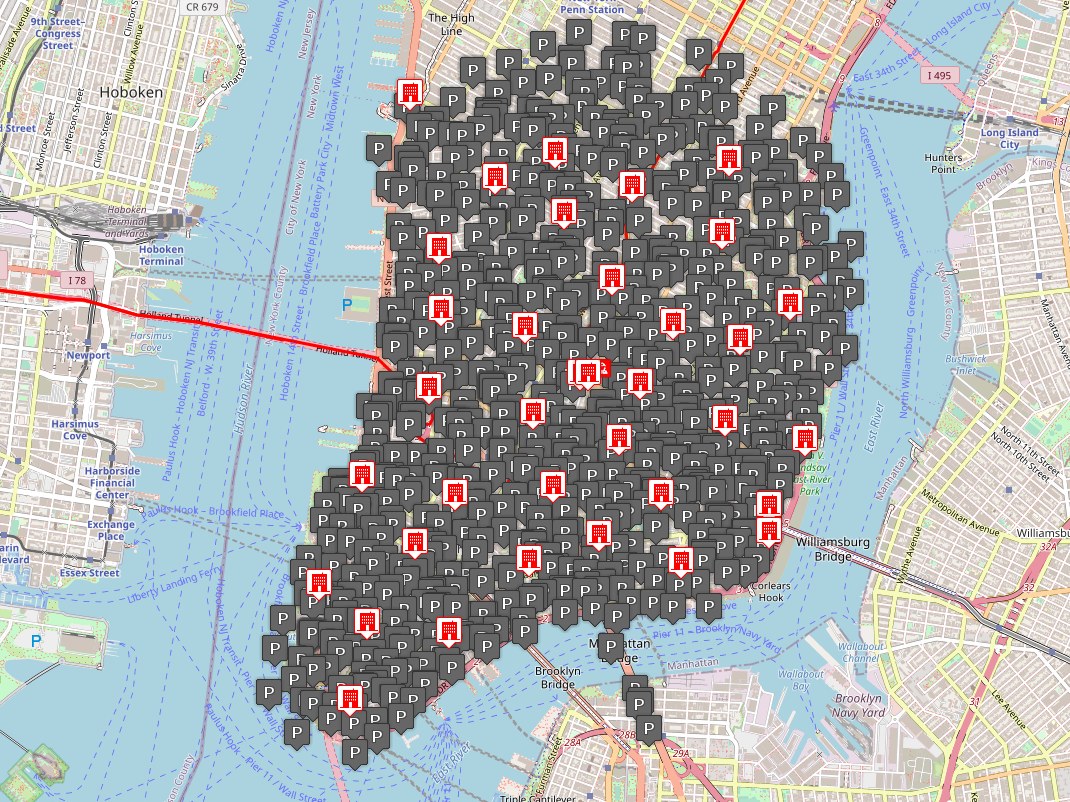
Sharing is caring
Mission credit value is set when the mission spawns (often roughly ±60% around the listed average). How many units you send does not change that figure — but more (and better-staffed) units finish the job faster.
When several players have a qualifying unit on scene at completion, each gets the full payout. The game does not split credits. Exception: rescue-only units (ambulance, EMS chief, etc.) do not count for payout — fire, police, water, or feds do.
Send the units the mission actually needs. If you cannot meet the requirement, one spare unit can still get you on the payout — but someone must bring the right kit or the call never finishes.
And when patients are left: send them to hospital when the mission is done.